Who actually charges you — and why it matters
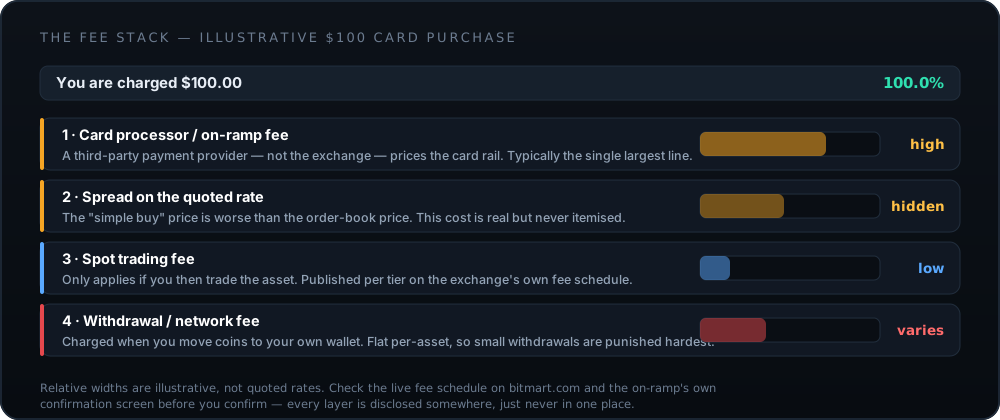
When you tap "Buy with card" in an exchange app, the exchange is usually not the one taking your card details. The transaction is handed to a third-party payment processor, a specialist fiat on-ramp that handles card acquiring, fraud screening and the regulatory obligations that come with touching card networks.
That structure has three consequences you will feel:
- Pricing is set by the processor, not the exchange. The competitive spot-trading fee on the exchange's fee page has nothing to do with what a card purchase costs.
- Declines are usually the processor's or your bank's, not the exchange's. Which is why exchange support often cannot tell you why a card failed.
- Your card statement may show an unfamiliar name. That is normally the processor, not fraud — but it is worth knowing before you see it.
Before you start
- Finish verification.
KYCgates card purchases everywhere. Complete it in advance, not while a price quote is counting down. - Tell your bank first. A thirty-second call — "I am making a cryptocurrency purchase today, please do not block it" — prevents the most common failure entirely.
- Check the card is in your own name and that the billing address matches your verified account. Mismatches are a standard fraud signal and will be declined.
- Have your banking app open for the
3-D Secureapproval. Hunting for your phone mid-flow is how quotes expire. - Know where the crypto is going afterwards. Have the destination wallet address ready before you buy, not after.
Buying with a debit card, step by step
-
Complete identity verification first
Card purchases sit behind
KYCon every regulated on-ramp — this is a payments-industry requirement, not an exchange preference. Do it before you have money in motion, because a card authorisation that expires while you upload documents has to be started again at a new price.Have a government photo ID and, often, a proof of address dated within three months.
-
Open the Buy Crypto flow and read the quote screen slowly
In the app or on the web platform, choose the buy-with-card option, select your currency and the asset you want, and enter an amount. The screen that appears next is the important one.
Look for three separate numbers: the amount charged to your card, the processing fee, and the quantity of crypto you receive. Divide the first by the third and compare that to the current market price. The gap is the spread — a real cost that is rarely labelled as one.
The quote is valid for a short window, often under a minute. If it expires you will be re-quoted at a new price — never re-confirm without re-reading the numbers.
-
Enter card details on the processor page, not a form you were sent
You will usually be handed off to a third-party payment provider. That is normal and expected. What matters is that you reached it by tapping through inside the app or from the official site — never from a payment link that arrived by email or message.
Check that the page is served over
HTTPSand that the merchant name shown matches the processor named in the app. -
Complete the 3-D Secure challenge
Your bank will typically ask you to approve the payment in its own app or via a one-time code. This is
3-D Secure, and it is the step where most crypto card purchases fail — banks apply extra scrutiny to this merchant category.Approve promptly. If the challenge times out, the whole purchase fails and you start over.
-
Confirm the credited amount against the quote
Once the purchase settles, open your account balance and confirm the quantity credited matches what the quote screen promised. Keep the confirmation — you will want it for tax records, and it is the only evidence you have if something needs disputing.
-
Move anything you are not actively trading to your own wallet
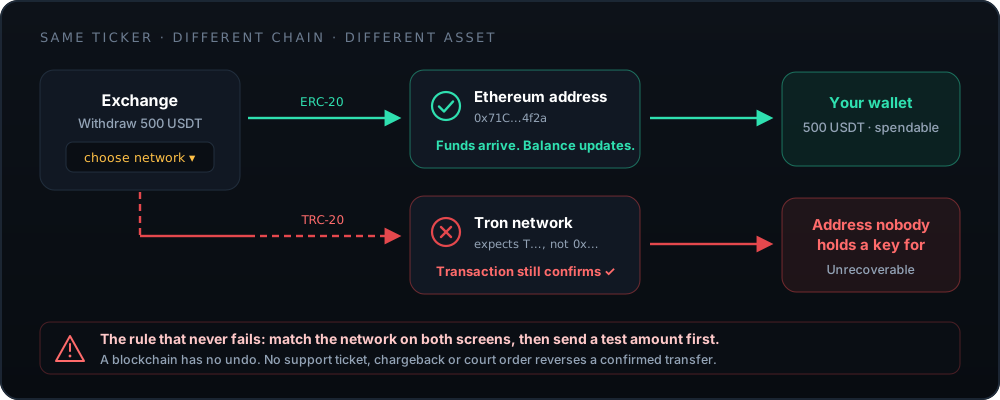
Withdraw to a wallet you control. Select the network carefully, send a minimum test amount first, confirm it arrives, and only then send the rest.
This is the step that converts an exchange balance into an asset you actually own.
Choosing the wrong network sends the funds to an address nobody controls on that chain. The transaction confirms successfully and the money is gone permanently. Match the network on both screens, every single time.
The real cost, worked through
Do this arithmetic once and you will never be surprised again. Take the quote screen and compute the effective price:
Effective price = total charged to your card ÷ quantity of crypto received
Compare that figure to the current market price on any independent price source. The difference, expressed as a percentage, is the true all-in cost — processor fee and spread combined. It is the only number that matters, and no fee page will show it to you.
| Cost layer | Set by | Shown where | Typical relative size |
|---|---|---|---|
| Card processing fee | Third-party payment provider | Itemised on the quote screen | Largest single line |
| Spread on the quote | The on-ramp | Not itemised anywhereOnly visible by comparing to market price | Frequently significant |
| Spot trading fee | The exchange | Published fee schedule | SmallOnly applies if you then trade |
| Network withdrawal fee | The exchange, tracking network costs | Withdrawal screen, per asset and network | Flat — brutal on small amounts |
| Foreign exchange margin | Your card issuer | Your bank statement, afterwards | Applies if currencies differ |
Three ways to pay less
- Use a bank transfer for anything substantial. Waiting one to three days is almost always worth it. Card rails are priced for convenience, and you are paying for speed you probably do not need.
- Buy in fewer, larger transactions. Percentage fees scale, but flat components — minimum processing fees, withdrawal fees — punish small tickets disproportionately. Four $50 purchases cost meaningfully more than one $200 purchase.
- Buy the asset you actually want, once. Buying a stablecoin and then converting adds a trading fee and a second spread. If you want the asset, buy the asset.
When the card is declined
Work down this list in order. It resolves the overwhelming majority of cases.
- 1. The bank blocked the merchant category
- Many issuers restrict cryptocurrency merchant category codes by default, and a growing number block them outright. Call the number on the back of the card and ask directly. If they decline as policy, no amount of retrying will help — and repeated attempts can flag the card for review.
- 2. 3-D Secure was not completed
- The approval prompt may arrive as a push notification, an in-app request or an SMS. If you missed it, the purchase fails silently from your side. Retry with the banking app already open.
- 3. Name or address mismatch
- The cardholder name must match the verified account name, and the billing address must match the card's registered address. A card in a partner's name will be declined, and attempting it repeatedly looks exactly like card testing.
- 4. Prepaid, virtual or gift card
- Most crypto on-ramps refuse these because they cannot be reliably tied to a verified identity. Use a standard debit or credit card issued to you personally.
- 5. Limits reached
- Two ceilings apply simultaneously: your bank's daily online-spend limit and the on-ramp's own per-transaction and per-day limits at your verification tier. Either will produce an unhelpful generic decline.
- 6. Region not supported
- The processor may not serve your country or your card's issuing country even where the exchange itself does. Check regional availability if you are in the US, and the New York page specifically if you are in NY.
Limits and how they lift
Card purchase limits are tiered against verification level, and there are usually three of them operating at once: per transaction, per day, and per month. They typically rise as you complete additional verification — basic identity, then proof of address, then in some cases source-of-funds documentation for higher tiers.
Two practical notes. First, complete the tier you will eventually need before you need it — upgrades take time to review, and they take longer when everyone is trying to buy at once. Second, splitting a large purchase into many small ones to stay under a limit is called structuring, and it is precisely the pattern automated compliance monitoring is built to detect. Raise the limit instead.
Why we do not recommend a credit card
Even where a credit card is accepted, there are three reasons to reach for the debit card instead.
- Cash-advance treatment. Many issuers classify crypto purchases as a cash advance. That means no interest-free period, a higher APR from the moment of purchase, and a separate cash-advance fee on top. You can pay a substantial premium before the crypto has moved at all.
- Borrowing to buy a volatile asset. If the position falls, the debt does not. This is the mechanism behind a very large share of genuinely ruinous retail crypto stories.
- Chargeback rights do not really apply. The goods were delivered; the settlement is irreversible. A chargeback on a completed crypto purchase is usually contested and lost, and it routinely ends with the exchange account permanently closed.
Getting the crypto out safely
Buying is the easy half. The withdrawal is where the irreversible mistakes live, so this part is worth reading slowly.
Once the test arrives and you have sent the rest, you are done — and the asset is genuinely yours rather than an entry in someone else's database. If Apple Pay would be more convenient next time, the Apple Pay guide covers what changes (less than you would think). If you want to understand who you are trusting with the intermediate step, the full BitMart review is the honest version.
Frequently asked questions
Can I use a debit card on BitMart?
Card purchases are offered through third-party payment providers integrated into the platform, with availability depending on your verified country and the card's issuing bank. Because the provider list and supported regions change, the reliable answer is the one on the buy screen in your own account — if the option appears and accepts your card, it is available to you.
Confirm current support and any regional restrictions on bitmart.com before planning around it.
How much does buying crypto with a debit card cost?
More than the trading fee, and usually more than people expect. Three costs stack: the payment processor's fee on the card rail, the spread between the quoted price and the market price, and — if you then move the crypto off the platform — a flat network withdrawal fee.
Card rails carry higher interchange and higher fraud losses than bank transfers, and that cost is passed on. The exact figures are disclosed on the confirmation screen before you pay; read that screen rather than any published estimate, including ours.
Why was my card declined?
In rough order of frequency: the issuing bank blocks cryptocurrency merchant categories outright; the 3-D Secure challenge was not completed in time; the billing name or address does not match the verified account; a daily or per-transaction limit was hit; or the card is a prepaid or virtual card the processor does not accept.
The fastest diagnostic is calling your bank and asking whether they declined it. If they did, they will say so — and often authorise it on request.
Is it safer to use a debit card or a bank transfer?
A bank transfer is cheaper and, for larger amounts, generally the better choice. Neither carries the trap that a credit card does — many issuers treat crypto purchases as a cash advance, which means interest from day one plus a cash-advance fee.
A debit card has one genuine advantage: it cannot spend money you do not have. If it is the difference between buying within your means and borrowing to buy crypto, use the debit card.
Can I get a refund on a crypto purchase?
Effectively no. Once the crypto is delivered, the transaction is complete from the merchant's point of view and blockchain settlement is irreversible. A chargeback filed after delivery will usually be contested and lost — and filing one commonly results in the exchange account being frozen or closed permanently.
The exception is genuine fraud on your card by a third party, which is a matter for your bank. Never file a chargeback simply because the price moved against you.
Should I leave the crypto on the exchange after buying?
Only what you are actively trading. The exchange holds the private keys for anything sitting in your account, which means your balance depends on that company remaining solvent, secure and willing to process your withdrawal.
For anything you intend to hold, move it to a wallet you control. See the custody explainer for the full reasoning.